
oxker
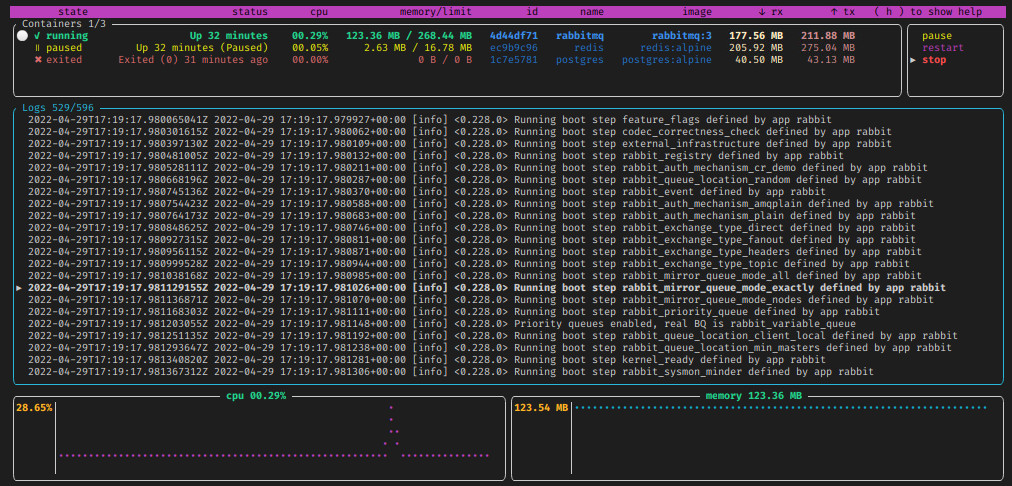
A simple tui to view & control docker containers
Built in Rust, making heavy use of tui-rs & Bollard
## Download & install
See releases
download & install (x86_64 one liner)
```bash
wget https://www.github.com/mrjackwills/oxker/releases/latest/download/oxker_linux_x86_64.tar.gz &&
tar xzvf oxker_linux_x86_64.tar.gz oxker &&
install -Dm 755 oxker -t "${HOME}/.local/bin" &&
rm oxker_linux_x86_64.tar.gz oxker
```
## Run
```oxker```
In application controls
| button| result|
|--|--|
| ```( tab )``` or ```( shift+tab )``` | Change panel, clicking on a panel also changes the selected panel|
| ```( ↑ ↓ )``` or ```( j k )``` or ```(PgUp PgDown)``` or ```(Home End)```| Change selected line in selected panel, mouse scroll also changes selected line |
| ```( enter )```| execute selected docker commands|
| ```( 1-9 )``` | sort containers by heading. Clicking on headings also sorts selected column |
| ```( 0 )``` | stop sorting |
| ```( h )``` | Show help menu - displays these options|
| ```( m )``` | toggle mouse capture - if disabled, text on screen can be selected|
| ```( q )``` | to quit at any time |
available command line arguments
| argument|result|
|--|--|
|```-d [number > 0]```| set the update interval for docker information, in ms, defaults to 1000 (1 second) |
|```-r```| Show raw logs, by default oxker will remove ANSI formatting (conflicts with -c) |
|```-c```| Attempt to color the logs (conflicts with -r) |
|```-t```| Remove timestamps from each log entry |
|```-g```| No tui, basically a pointless debugging mode, for now |
## Build step
### x86_64
```cargo build --release```
### Raspberry pi
requires docker & cross-rs
#### 64bit pi (pi 4, pi zero w 2)
```cross build --target aarch64-unknown-linux-gnu --release```
#### 32bit pi (pi zero w)
Tested, and fully working on pi zero w, running Raspberry Pi OS 32 bit, the initial logs parsing can take an extended period of time if thousands of lines long, suggest running with a -d argument of 5000
```cross build --target arm-unknown-linux-musleabihf --release```
If no memory information available, try appending ```/boot/cmdline.txt``` with
```cgroup_enable=cpuset cgroup_enable=memory```
see https://forums.raspberrypi.com/viewtopic.php?t=203128 and https://github.com/docker/for-linux/issues/1112
### Untested on other platforms
## Tests
As of yet untested, needs work
```cargo test -- --test-threads=1```
Run some example docker images
using docker-compose.yml;
```docker compose -f docker-compose.yml up -d```
or individually
```docker run --name redis -d redis:alpine3.16```
```docker run --name postgres -e POSTGRES_PASSWORD=never_use_this_password_in_production -d postgres:alpine3.16```
```docker run -d --hostname my-rabbit --name rabbitmq rabbitmq:3```
